Free Bill Tracker Template: Never Miss a Due Date
A free bill tracker for Google Sheets and Excel that shows days left until each bill is due, highlights bills due soon and has a monthly checklist.

A missed bill rarely happens because there was no money. It happens because the due date slipped past while you were busy. Then come the late fee, the awkward phone call and, if it happens often, a mark on your credit history.
This free bill tracker keeps every bill on one page, shows how many days are left until each one is due, and turns a bill red when it is three days away. A simple checklist lets you tick off each bill once it's paid.
Download the free bill tracker (.xlsx)
No sign-up and no email needed. It works in Google Sheets and Excel.
What's inside the tracker
| Tab | What it does |
|---|---|
| Start here | Four short steps |
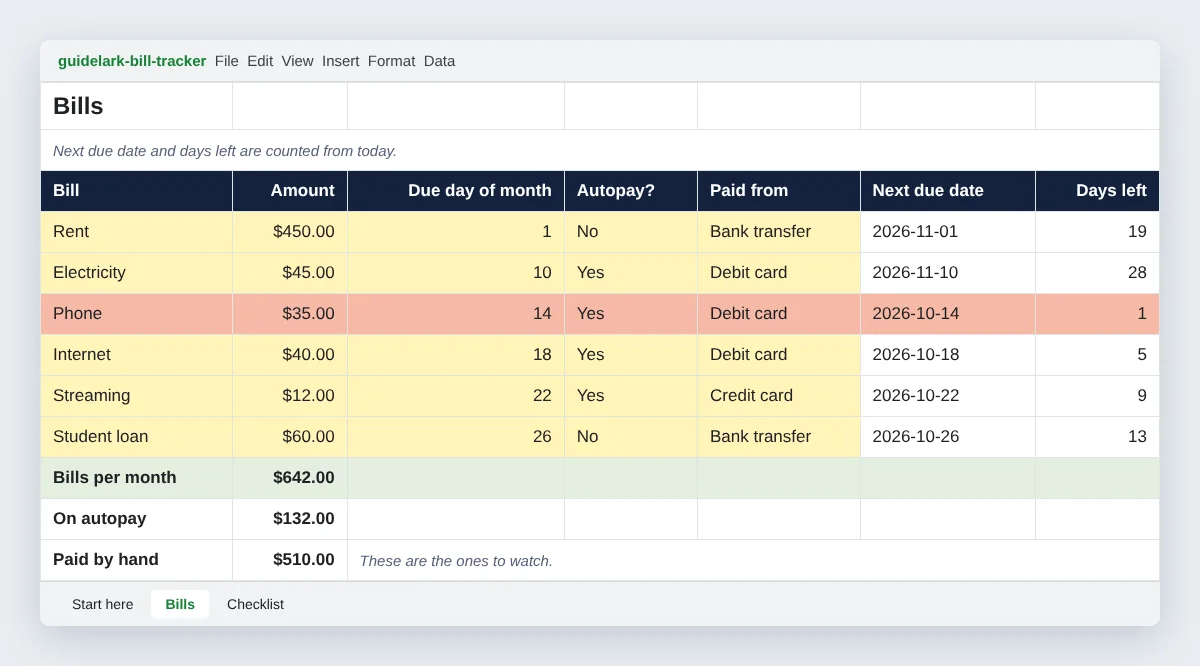
| Bills | Up to 15 bills with amount, due day, autopay and how you pay, plus the next due date and days left |
| Checklist | A grid of bills and months. Type x when a bill is paid, and the bottom row adds up what you've paid each month |
Yellow cells are for you to type in. White cells calculate by themselves.
How to open it
Google Sheets: in Google Drive, choose New, then File upload, pick the file, double-click it, then choose File, then Save as Google Sheets. Add the Google Sheets app to your phone so you can check it anywhere.
Excel: download the file and open it.
How to fill it in
1. List every bill
On the Bills tab, type each bill with:
- Amount, the usual amount (an average for bills that vary, like electricity)
- Due day of month, from 1 to 28. If a bill is due on the 29th, 30th or 31st, type 28 so you always plan to pay a little early
- Autopay?, Yes or No from the dropdown
- Paid from, the account or card it comes out of
Find them all by going through two months of bank statements. People usually forget the annual subscriptions and the small monthly ones.
2. Watch the days left
The sheet works out the next due date for each bill and the days left until then, counting from today. Any bill due in three days or less turns red.
Open the sheet once or twice a week, and the red rows tell you what needs doing.
3. Tick off what you've paid
On the Checklist tab, type x under the month when you pay a bill. The bill names and amounts come across from the Bills tab automatically. The Paid this month row adds up the bills you've ticked.
A worked example
The example has six bills worth $642 a month:
| Bill | Amount | Due day | Autopay |
|---|---|---|---|
| Rent | $450 | 1 | No |
| Electricity | $45 | 10 | Yes |
| Phone | $35 | 14 | Yes |
| Internet | $40 | 18 | Yes |
| Streaming | $12 | 22 | Yes |
| Student loan | $60 | 26 | No |
The totals at the bottom of the Bills tab show $132 on autopay and $510 paid by hand. The $510 is the part to watch: if you forget rent or the student loan, nothing pays them for you.
Opened on October 13, 2026, the phone bill is due the next day, so its row is red. Internet is 5 days away, streaming 9, the student loan 13. Rent was paid on October 1, so its next due date is November 1.
On the Checklist tab, every bill is ticked for September ($642), and so far rent and electricity are ticked for October ($495).
How the formulas work
- Next due date: if today's day of the month is on or before the due day, the next due date is this month. Otherwise it is next month. The sheet builds the date with
DATEandTODAY. - Days left: the next due date minus today.
- The red rows come from conditional formatting: a rule that colours a row when days left is 3 or less.
- Paid this month adds up the amounts of the bills with an x in that month's column.
Because it uses TODAY, the dates and days left change every day. That is the point: it is always up to date when you open it.
Five ways to never miss a bill again
- Put fixed bills on autopay. If the amount is the same every month, let it pay itself. Just make sure the money is in the account a few days before.
- Move due dates to just after payday. Many lenders, phone companies and utilities let you choose a different due date. If your bills cluster in the week before payday, ask. If you are paid every two weeks, the biweekly budget template shows which paycheck covers each bill.
- Set a reminder for hand-paid bills. A phone reminder two days before each due date, for the bills marked No.
- Keep a small buffer in your bills account. Even $50 more than your bills need stops a payment bouncing when an amount is a little higher than usual.
- Review the list once a month. It takes two minutes, and it is where you spot subscriptions you no longer use. The monthly money review builds it into a simple routine.
Bill tracker or budget?
They do different jobs. A budget decides how much goes to each category. A bill tracker makes sure the bills in that budget are paid on time. If your bills are few and all on autopay, the budget may be enough. If you have several bills paid by hand, or you've ever paid a late fee, a tracker is worth the five minutes it takes to set up.
Frequently asked questions
Is the tracker free? Yes. Download it, change it and share it.
Does it send me reminders? No. A spreadsheet can't send notifications by itself. Open it once or twice a week, or set phone reminders for the bills you pay by hand.
What about bills that come once a year? List them in the sinking funds spreadsheet instead. It works out how much to save each month so the money is ready.
What happens at the end of the year? Make a copy of the file, clear the x marks on the Checklist tab, and start again.
This tracker is general information, not financial advice. The example numbers are made up to show the format.