Emergency Fund Calculator: How Much You Need and How Long It Takes
A free emergency fund calculator for Google Sheets and Excel. See your target from a $500 starter fund to six months of essentials, and when you'll get there.

"Save three to six months of expenses" is the standard emergency fund advice. But three to six months of what, exactly? And at the amount you can actually save, how long will it take?
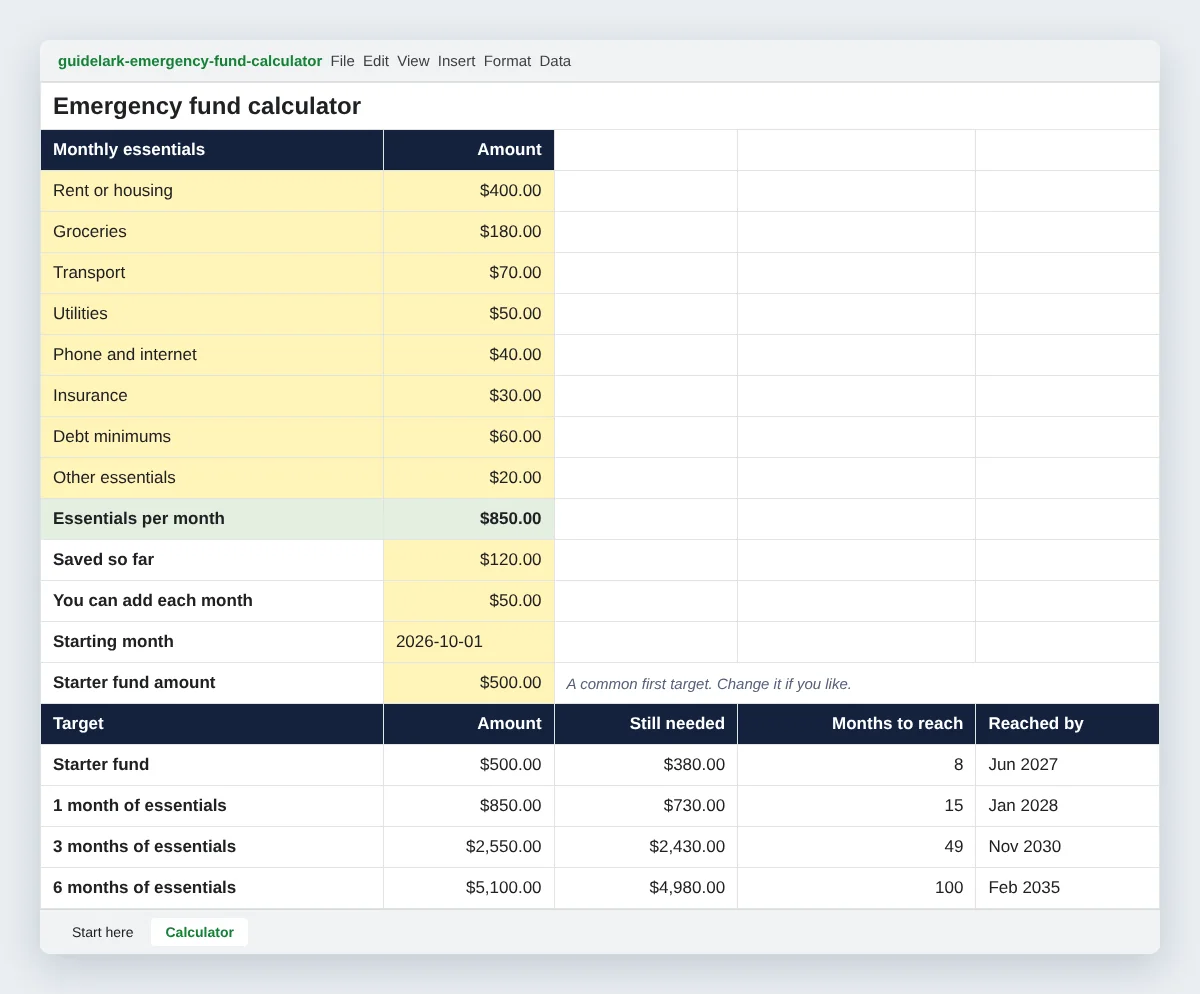
This free calculator answers both. You type what your essentials cost and what you can save each month, and it shows four targets, from a $500 starter fund to six months of essentials, with the month you will reach each one.
Download the free emergency fund calculator (.xlsx)
No sign-up and no email needed. It works in Google Sheets and Excel.
Why the number should be your essentials, not your spending
An emergency fund has one job: to keep the important bills paid when your income stops or a big surprise lands. In a real emergency you would cut everything else. So the target is based on your essentials, the costs you would still have to pay:
- rent or housing
- groceries (a basic shop, not your usual one)
- transport to work or to look for work
- utilities, phone and internet
- insurance
- minimum debt payments
Eating out, subscriptions, clothes and nights out are not on the list. That makes the target smaller and much more reachable.
What's inside the calculator
| Tab | What it does |
|---|---|
| Start here | Four short steps |
| Calculator | Your monthly essentials, what you have saved, what you can add each month, and four targets with how long each will take |
Yellow cells are for you to type in. White cells calculate by themselves.
How to open it
Google Sheets: in Google Drive, choose New, then File upload, pick the file, double-click it, then choose File, then Save as Google Sheets.
Excel: download the file and open it.
How to use it
- Type your monthly essentials. There are eight lines: rent, groceries, transport, utilities, phone and internet, insurance, debt minimums and other essentials. Rename any of them. Your budget or a month of tracked spending will have the numbers.
- Type what you have saved for emergencies already.
- Type what you can add each month. Be realistic. $25 a month that you keep up beats $100 that you stop after two months.
- Type the month you are starting, such as
2026-10-01. - Change the starter fund if you like. It is set to $500.
A worked example
The example has $850 of monthly essentials:
| Essential | Per month |
|---|---|
| Rent | $400 |
| Groceries | $180 |
| Transport | $70 |
| Utilities | $50 |
| Phone and internet | $40 |
| Insurance | $30 |
| Debt minimums | $60 |
| Other essentials | $20 |
| Total | $850 |
With $120 already saved and $50 added each month from October 2026, the calculator shows:
| Target | Amount | Months | Reached by |
|---|---|---|---|
| Starter fund | $500 | 8 | June 2027 |
| 1 month of essentials | $850 | 15 | January 2028 |
| 3 months of essentials | $2,550 | 49 | November 2030 |
| 6 months of essentials | $5,100 | 100 | February 2035 |
Look at the jump between the rows. The starter fund takes eight months. Six months of essentials takes more than eight years. That is not a reason to give up. It is a reason to focus on the first two rows and let the rest come later.
What a bigger monthly amount does
The monthly amount matters far more than anything else in the sheet. Here are the same targets at different amounts, still starting with $120 saved:
| Saving each month | Starter fund | 3 months of essentials |
|---|---|---|
| $50 | 8 months | 49 months |
| $100 | 4 months | 25 months |
| $150 | 3 months | 17 months |
Going from $50 to $100 halves the time. If $100 a month sounds impossible, look for a one-off boost instead: a tax refund, selling things you no longer use, or a few weeks of side work with every dollar going into the fund.
Which target is right for you?
- Start with the starter fund. About $500 covers many of the surprises that push people into debt: a car repair, a dental bill, a broken phone. In the Federal Reserve's latest household survey, 63% of US adults said they would cover an unexpected $400 expense with cash or its equivalent. The starter fund puts you in that group.
- Then aim for one month of essentials. That covers a short gap between jobs or a bigger repair.
- Three months is a solid fund for most people with a steady job.
- Six months makes sense if your income is irregular, you work for yourself, or other people depend on your pay.
Our full guide to building an emergency fund on a small income explains where to keep the money and what counts as an emergency.
Should you save or pay off debt first?
Both, in order. Build the starter fund first, while paying the minimums on your debts. Without it, the next surprise goes on a credit card and undoes your progress. Once the starter fund is in place, put your extra money towards high-interest debt. The debt payoff spreadsheet helps you plan that. Then come back and build the fund to one month and beyond.
How the formulas work
- Essentials per month is the sum of the eight lines.
- Each target's amount is the starter amount, or the essentials times 1, 3 or 6.
- Still needed is the amount minus what you have saved, never below zero.
- Months to reach is still needed divided by the monthly amount, rounded up with
ROUNDUP, because you can't reach a target in 7.6 months. You need the eighth. - Reached by uses
EDATEto add that many months to your starting month.
Frequently asked questions
Is the calculator free? Yes. Download it, change it and share it.
Does it include interest? No. On small balances, interest in a savings account adds very little over a few months, so the calculator leaves it out. Any interest you do earn simply gets you there a little sooner.
What should I do when I reach a target? Celebrate, then keep going to the next one, or, if you've reached your goal, redirect the monthly amount to other savings goals or debt.
What if I have to use the fund? That's what it's for. Use it, then type the new, lower amount in "Saved so far" and the calculator shows how long it will take to refill.
This calculator is general information, not financial advice. The example numbers are made up to show the format.