Biweekly Budget Template: Plan Your Money Paycheck by Paycheck
Paid every two weeks? This free biweekly budget template shows which bills each paycheck must cover, spots short paychecks and three-payday months.

If you are paid every two weeks, a monthly budget never quite fits. Rent is due on the 1st, but your paydays move around the calendar, and some months the paycheck before rent is the small one. You can be fine for the month and still be short for a few days.
The answer is to budget by paycheck. This free template takes your paydays and your bills, and shows which bills each paycheck has to cover and what is left, for the next 26 paychecks.
Download the free biweekly budget template (.xlsx)
No sign-up and no email needed. It works in Google Sheets and Excel.
Why biweekly pay needs a different budget
Paid every two weeks, you get 26 paychecks a year, not 24. That means:
- Most months have two paydays, but two months a year have three. Those extra paychecks are the best part of biweekly pay, if you plan for them.
- Your paydays drift. A payday on the 2nd this month might be on the 30th a few months later. Bills stay on the same date, so the pairing of paychecks and bills keeps changing.
- Monthly averages hide the gaps. Over a year you might have plenty. On the day rent is due, you might not.
A paycheck budget answers one simple question for every payday: which bills does this money have to cover before the next one arrives?
What's inside the template
| Tab | What it does |
|---|---|
| Start here | Five short steps |
| Setup | Your take-home pay per paycheck, one payday, and up to 15 bills with their due day |
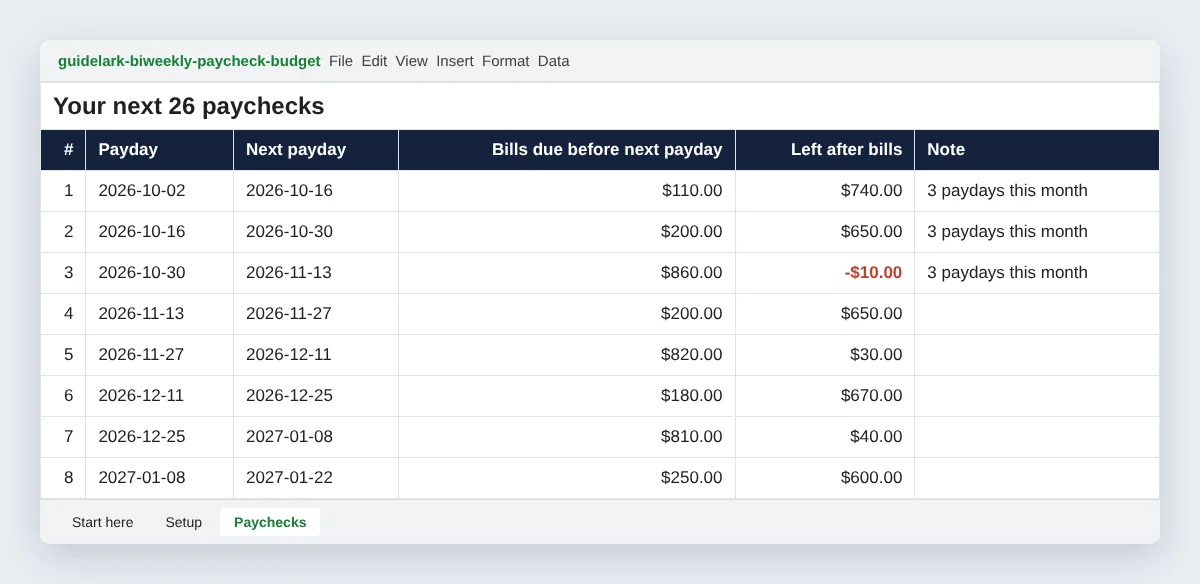
| Paychecks | The next 26 paydays, the bills due before each following payday, what is left, and which months have three paydays |
Yellow cells are for you to type in. White cells calculate by themselves.
How to open it
Google Sheets: in Google Drive, choose New, then File upload, pick the file, double-click it, then choose File, then Save as Google Sheets.
Excel: download the file and open it.
How to fill it in
1. Type your pay
On the Setup tab, type your take-home pay per paycheck, what actually lands in your account. If it varies, use a normal low paycheck.
2. Type one payday
Any recent or upcoming payday works. The sheet adds 14 days, again and again, to find the rest.
3. List your bills
For each bill, type the amount and the day of the month it is due. Use days 1 to 28. If a bill is due on the 29th, 30th or 31st, type 28: it is safer to plan to pay a little early.
Only list fixed bills here: rent, utilities, phone, insurance, loan payments. Groceries and day-to-day spending come out of whatever is left.
4. Read the Paychecks tab
For each payday you see:
- the next payday
- bills due before next payday, the total of every bill that falls in that two-week window
- left after bills, which is your money for food, transport and everything else until the next paycheck
- a note when a month has three paydays
A negative number in red means that paycheck can't cover its bills on its own.
A worked example
The example uses $850 paychecks, with the first on October 2, 2026, and six bills that add up to $1,060 a month:
| Bill | Amount | Due day |
|---|---|---|
| Rent | $750 | 1 |
| Utilities | $70 | 8 |
| Phone | $40 | 12 |
| Internet | $45 | 18 |
| Car insurance | $95 | 20 |
| Student loan | $60 | 25 |
Here is what the first few paychecks look like:
| Payday | Bills before next payday | Left |
|---|---|---|
| Oct 2 | $110 | $740 |
| Oct 16 | $200 | $650 |
| Oct 30 | $860 | -$10 |
| Nov 13 | $200 | $650 |
| Nov 27 | $820 | $30 |
The October 30 paycheck has to pay rent on November 1, plus utilities and the phone before November 13. That's $860 from an $850 paycheck. Over the full 26 paychecks, six come up short, and the worst are $55 short: those are paychecks in February, March and August 2027 that have to cover car insurance, the student loan and rent in the same two weeks.
Yet over the year, this person earns $22,100 and their bills cost $12,720. There is plenty of money. It's just in the wrong paycheck.
How to fix a short paycheck
You can see every short paycheck months in advance, so you have options:
- Hold some back from the paycheck before. The October 16 paycheck has $650 left. Keeping $60 of it aside covers October 30 with room to spare. This is the simplest fix, and it works every time.
- Move a due date. Many lenders, phone companies and utilities let you choose a different due date. Test it first: change the due day on the Setup tab and check the whole list. A move that fixes one paycheck can break another. In the example, moving the car insurance to the 8th actually makes things worse.
- Use the third-paycheck months. In the example, October 2026 and April 2027 each have three paydays. One extra paycheck can build a buffer of a few hundred dollars that covers every short paycheck for the rest of the year.
A buffer of one paycheck's bills, kept in your main account, ends the problem for good. Once you have it, the drifting paydays stop mattering.
What to do with three-paycheck months
Your normal bills already fit into two paychecks most months, so the third paycheck is free money. Good uses:
- build the buffer described above
- grow a starter emergency fund
- make an extra payment on your highest-rate debt (the debt payoff spreadsheet shows how much that saves)
- top up your sinking funds for yearly costs
Decide before the money arrives. If you don't, the extra paycheck tends to disappear into ordinary spending, which is a quiet form of lifestyle inflation.
How the formulas work
- Paydays: each one is the first payday plus 14 days times the paycheck number.
- Bills before next payday: for each bill, the sheet builds this month's and next month's due date with
DATE, checks whether either falls between this payday and the next one, and adds up the amounts that do. It usesSUMPRODUCTto do that for all bills at once. - Three paydays:
COUNTIFScounts how many paydays fall in the same calendar month.
Frequently asked questions
Is the template free? Yes. Download it, change it and share it.
Does it work for weekly pay? Not as it is. It is built for paychecks 14 days apart.
Does it work if I'm paid twice a month on fixed dates, like the 1st and the 15th? That is semi-monthly pay, not biweekly. Your paydays don't drift, so a normal monthly budget split into two halves works fine.
Are there ever 27 paychecks in a year? Occasionally, yes. Because a year is 52 weeks plus a day or two, the calendar slowly shifts, and every decade or so a year has 27 biweekly paydays. The sheet always shows the next 26 paydays from the date you type, so it still works.
This template is general information, not financial advice. The example numbers are made up to show the format.